Lab 1 - Multi-Blink
Practice three ways to generate square waves
Summary
Create a classic 'hello world' LED blinker, then change it to run using PWM & Alarms.
Demonstrate control multiple LEDs blinking at different rates.
1. Basic wiring & wiring verification
- create a pico project: blink-cpu-timed
- wire 2-4 exteral leds
- ensure all gpios output independant signals using gpio_put()
2. PWM Muli-Blink
-create a pico project: blink-pwm-timed
- use same wiring
- setup all gpio pins (including 25/built-in) as PWM
- alternate - use a dimmer
3. Alarm Multi-Blink
- create a pico project: blink-alarm-timed
- use same wiring
- setup all gpio pins (including 25/built-in) as gpio
- setup an one or more alarms to toggle the pins at different rates
Required Equipment and Supplies
- Rasperry Pi Pico with Headers - pinout diagram
- LED - indicator [x2-4]
- 820Ω Resistor [x2-4]
- USB Micro Cable
- Breadboard
- Cables and 22ga wire as needed
Wiring
- Only begin adding external LEDs after your basic blink and alarm blink are working.
- LEDs consume very little power, you may power everything from the USB cable.
- Use VBus or Vsys to supply your breadboard power rail from the Pi Pico.
- Connect each LED to separate GPIO pin and in series with a current limiting resistor connected to ground like the example below.
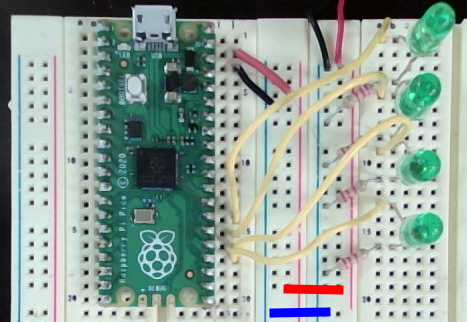
Part 1 - CPU Timed Blink
main.c
#include "pico/stdlib.h"
#define LED_ONB 25

int main() {
// setup and  initialize
gpio_init(LED_ONB);
gpio_set_dir(25, GPIO_OUT);

// primary loop
	while (true) {
		gpio_put(LED_ONB, 1);
		sleep_ms(500);
		gpio_put(LED_ONB, 0);
		sleep_ms(500);
	}
}
Part 2 - PWM Timed Blink
PWM Period Timing Formula

PWM Duty Cycle Formula

PWM Pulse Width Timing Formula

main.c
#include "pico/stdlib.h"
#include "hardware/pwm.h"
#include "math.h"

#define LED_EXT_1 18

void led_blinking_pwm_setup(uint gp_pin_no, float blinks_per_second, float duty);

void main(){

  led_blinking_pwm_setup(LED_EXT_1, 15, 0.65);


  while(true) {
    //primary loop - runs until reboot
    sleep_ms(10);
  }
}


void led_blinking_pwm_setup(uint gp_pin_no, float blinks_per_second, float duty){
  //turn the requested pin on PWM mode
  gpio_set_function(gp_pin_no, GPIO_FUNC_PWM);
  //look up the slice for our pin
  uint slice_num = pwm_gpio_to_slice_num(gp_pin_no);
  // k = clock div * (wrap + 1)

  double k = 125000000.0 / blinks_per_second;

  uint16_t wrap_counts;
  if(k > 65534) wrap_counts = 65534;
  else wrap_counts = k;

  double clock_div = k / (wrap_counts + 1);


  pwm_set_clkdiv_int_frac(slice_num, clock_div, 0);
  pwm_set_wrap(slice_num, wrap_counts);
  uint16_t level = (wrap_counts + 1) * duty;

  pwm_set_gpio_level(gp_pin_no, level); //set duty

  pwm_set_enabled(slice_num, true);
}
Part 3 - Alarm Timed Blink
main.c
#include "pico/stdlib.h"
#include "led-alarm-blinker.h"

#define LED_ONB 25
#define LED_EXT1 18
led_alarm_blinker_t led_onb_blinker, led_ext1_blinker;

void main(){
  setup_led_blinker(&led_onb_blinker, LED_ONB, 10000, 500000);
  setup_led_blinker(&led_ext1_blinker, LED_EXT1, 10000, 311000);

  while(1){
    sleep_ms(10);
  }
}
led-alarm-blinker.h
//.h HEADER
//led-alarm-blinker.h
#include "pico/stdlib.h"

typedef struct led_alarm_blinker_t {
  uint gp_pin;
  int64_t on_us, off_us;
  bool state;
} led_alarm_blinker_t;

void setup_led_blinker(led_alarm_blinker_t *led_blinker, int pin_no,
   int64_t on_delay_us, int64_t off_delay_us);

int64_t led_blinker_alarm_callback(alarm_id_t id, void *user_data);
led-alarm-blinker.c
//.c SOURCE
//led-alarm-blinker.c
#include "led-alarm-blinker.h"

void setup_led_blinker(led_alarm_blinker_t *led_blinker, int pin_no,
   int64_t on_delay_us, int64_t off_delay_us){

     led_blinker->gp_pin = pin_no;
     led_blinker->on_us = on_delay_us;
     led_blinker->off_us = off_delay_us;
     led_blinker->state = false; //assume the light is off at first
      //pin setup
     gpio_init(led_blinker->gp_pin);
     gpio_set_dir(led_blinker->gp_pin, GPIO_OUT);
     gpio_put(led_blinker->gp_pin, led_blinker->state);
      //alarm setup
     add_alarm_in_us(led_blinker->on_us, led_blinker_alarm_callback,
      led_blinker, true);

   }

 int64_t led_blinker_alarm_callback(alarm_id_t id, void *user_data){
    //cast userdata as an led_blinker struct pointer
    led_alarm_blinker_t *led_blinker = (led_alarm_blinker_t *)user_data;
    //toggle the state
    led_blinker->state = !(led_blinker->state);
    //set the gpio state
    gpio_put(led_blinker->gp_pin, led_blinker->state);
    //return the timing data
    if(led_blinker->state == true) {
      return -1*led_blinker->on_us;
    } else {
      return -1*led_blinker->off_us;
    }
 }